%20rotate(-45)'/%3e%3cpath%20id='Rectangle_4'%20data-name='Rectangle%204'%20class='cls-2'%20d='M77.46,23.45l14.57-14.57c11.84-11.84,31.03-11.84,42.87,0l43.94,43.94c11.84,11.84,11.84,31.03,0,42.87l-14.57,14.57h0L77.46,23.45h0Z'/%3e%3cg%3e%3cpath%20class='cls-1'%20d='M283.26,141.98h-5.3l-12.5-36.8v47.6h-8.8v-70h9l14.9,43.5,15.1-43.5h9.3v70h-9.1v-47.6l-12.6,36.8Z'/%3e%3cpath%20class='cls-1'%20d='M316.15,152.78v-70h29.5v8.3h-20.1v22h17v8.4h-17v23h20.4v8.3h-29.8Z'/%3e%3cpath%20class='cls-1'%20d='M384.55,91.08h-12.2v61.7h-9.4v-61.7h-12.2v-8.3h33.8v8.3Z'/%3e%3cpath%20class='cls-1'%20d='M391.45,152.78v-70h29.5v8.3h-20.1v22h17v8.4h-17v23h20.4v8.3h-29.8Z'/%3e%3cpath%20class='cls-1'%20d='M457.65,152.78l-9.7-28.7h-8.2v28.7h-9.4v-70h17.5c10.6,0,17,4.5,17,14.8v11.7c0,7-3,11.3-8.2,13.4l10.6,30.1h-9.6ZM439.75,115.88h7.7c5.2,0,8-2.1,8-8.3v-8.2c0-6.2-2.8-8.3-8-8.3h-7.7v24.8Z'/%3e%3cpath%20class='cls-1'%20d='M509.95,97.58v12.5c0,10.3-6.4,14.8-17,14.8h-8.1v27.9h-9.4v-70h17.5c10.6,0,17,4.5,17,14.8ZM500.55,99.38c0-6.2-2.8-8.3-8-8.3h-7.7v25.4h7.7c5.2,0,8-2.1,8-8.2v-8.9Z'/%3e%3cpath%20class='cls-1'%20d='M535.15,81.98h.8c10.6,0,17,4.5,17,14.8v42c0,10.3-6.4,14.8-17,14.8h-.8c-10.6,0-17-4.5-17-14.8v-42c0-10.4,6.4-14.8,17-14.8ZM535.55,145.28c5.2,0,8-2.1,8-8.3v-38.4c0-6.2-2.8-8.3-8-8.3s-8,2.1-8,8.3v38.4c0,6.2,2.8,8.3,8,8.3Z'/%3e%3cpath%20class='cls-1'%20d='M591.05,152.78l-9.7-28.7h-8.2v28.7h-9.4v-70h17.5c10.6,0,17,4.5,17,14.8v11.7c0,7-3,11.3-8.2,13.4l10.6,30.1h-9.6ZM573.15,115.88h7.7c5.2,0,8-2.1,8-8.3v-8.2c0-6.2-2.8-8.3-8-8.3h-7.7v24.8Z'/%3e%3cpath%20class='cls-1'%20d='M637.75,91.08h-12.2v61.7h-9.4v-61.7h-12.2v-8.3h33.8v8.3Z'/%3e%3cpath%20class='cls-1'%20d='M663.05,136.28h-15l-3,16.5h-9.1l13.9-70h11.6l14.1,70h-9.6l-2.9-16.5ZM661.55,128.38l-6-33.8-6.1,33.8h12.1Z'/%3e%3cpath%20class='cls-1'%20d='M710.85,152.78h-28.3v-70h9.4v61.5h18.9v8.5Z'/%3e%3c/g%3e%3c/g%3e%3c/g%3e%3c/svg%3e)
Change meter name
If you have several meters at one address, you can name each meter so it is easier to keep track of the different meters.
Back to guides
If you have several meters at one address, you can name each meter so it is easier to keep track of the different meters.
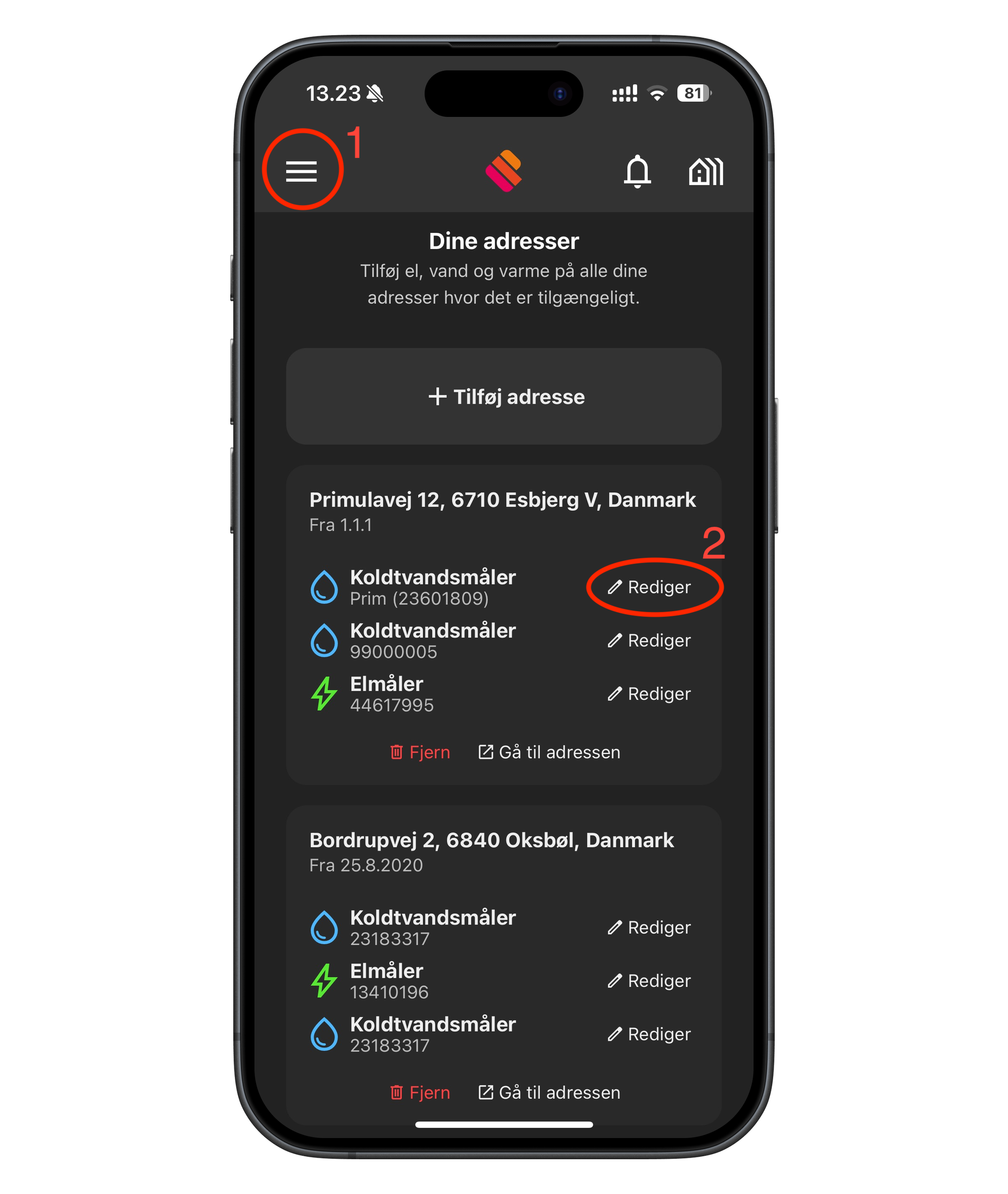
- Tap the 3 lines at the top and select "Your addresses"
- Tap "Edit" on the meter you want to rename.
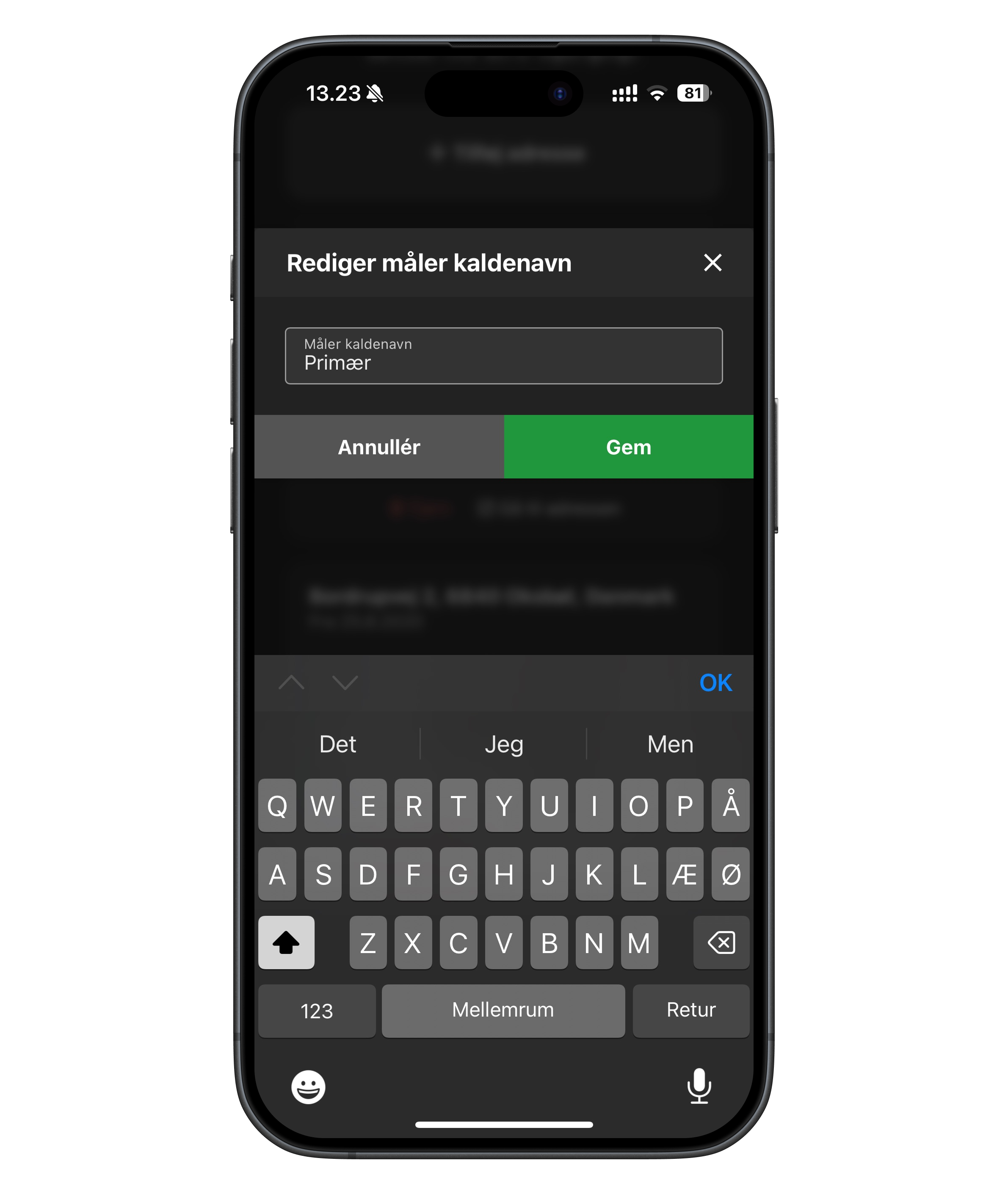
Now type the name you want for the meter, in this example: "Primary", and finish by tapping save.
Now tap "Go to address"
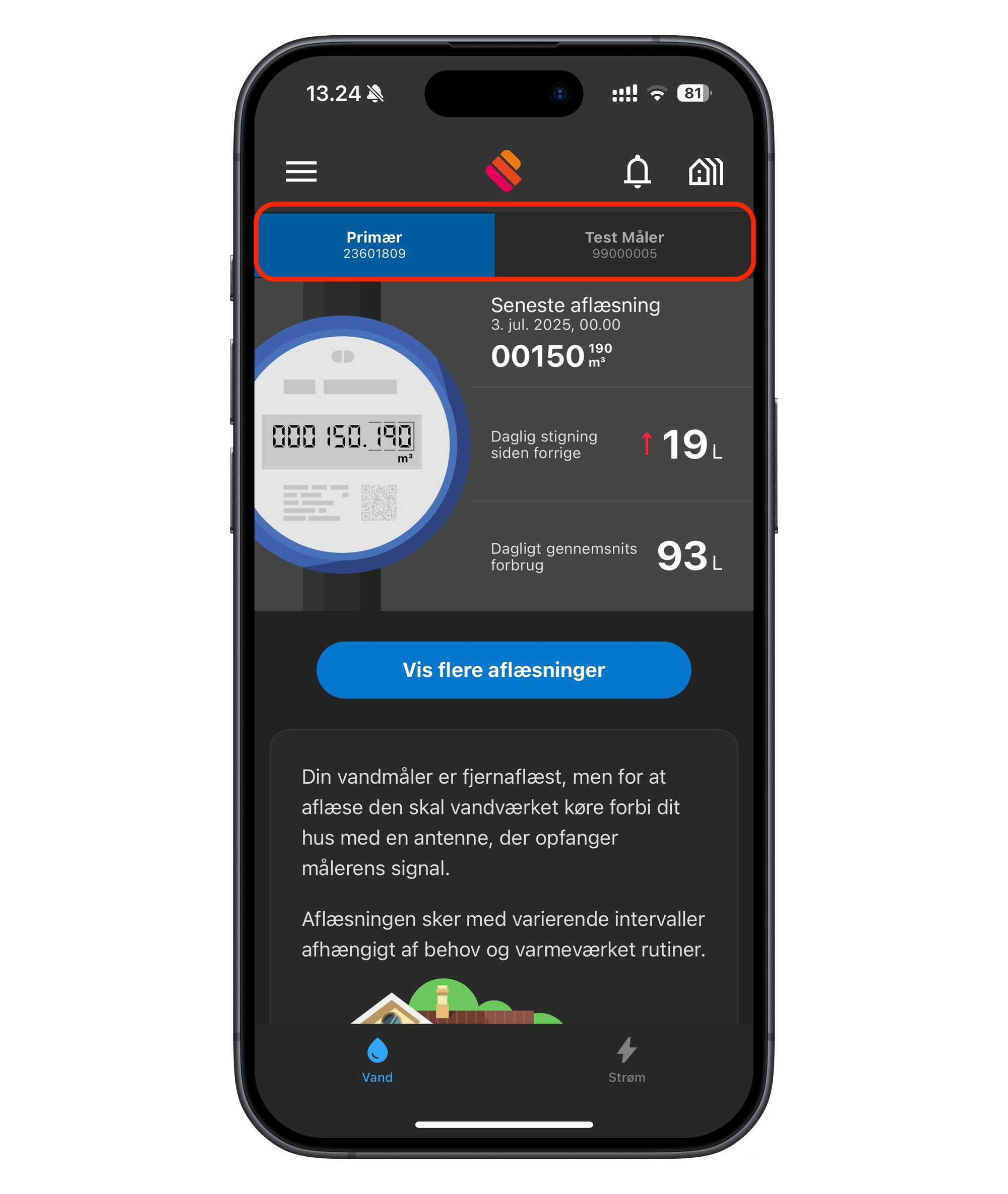
The name now appears at the top, for example "Primary" on the left, and another "Test meter" on the right.